
Views: 0 Author: Site Editor Publish Time: 2026-10-21 Origin: Site


Picture this familiar corporate shuffle. Someone fumbles with the window blinds. Another person desperately adjusts the dimmer switch. A presenter wrestles with a tangled HDMI cable just to get the morning sync started. For decades, this was the accepted ritual for business gatherings. Times have fundamentally changed. As workplace collaboration evolves, teams demand far more dynamic tools than passive presentations can offer. The battle for meeting room supremacy has narrowed down to two main contenders. One is the legacy projection system. The other is the modern digital canvas. This guide dissects both technologies from a hardware engineering perspective. We will explore their operational differences, evaluate their true return on investment, and determine the best fit for your workspace.
Interactivity Over Passive Viewing: Modern digital canvases transform meetings from one-way presentations into two-way collaborative sessions using intuitive touch technology.
Total Cost of Ownership: While projection units have a lower upfront cost, flat panels yield a significantly better long-term ROI due to zero bulb replacements and minimal IT maintenance.
Hybrid Work Compatibility: Today's flat screens offer built-in cameras, microphones, and seamless cloud integration. This makes them vastly superior for remote team collaboration.
Room Dynamics Matter: Projectors still hold an edge in massive auditoriums requiring massive displays. For standard meeting rooms, the all-in-one digital board is the undisputed standard.
In the late twentieth century, projection hardware revolutionized the boardroom. A single presenter could broadcast data to a large audience, eliminating paper handouts entirely. Their primary function was straightforward. They magnified static images or slides for a seated audience. From a hardware standpoint, these setups were complex. They required ceiling mounts, long cable runs, separate audio receivers, and motorized drop-down screens.
Business workflows eventually shifted from top-down lectures to agile brainstorming. Technology had to pivot accordingly. Rather than just reflecting a static image, a modern smart board acts as an all-in-one collaborative hub. It combines the expansive visual real estate of a large screen with the processing power of a computer. This tactile engagement fundamentally alters how teams interact with their data.
Recent industry trend analyses reveal a massive shift in audiovisual investments. Standalone corporate projector sales have experienced continuous, double-digit declines over the last three years. Simultaneously, interactive flat panels are seeing explosive compound annual growth. This macro trend reflects a deeper corporate mandate. Modern workspaces must facilitate active participation. Hybrid work models require remote attendees to see content clearly without the glare and poor contrast associated with webcam-recorded projection screens. The market has spoken. Enterprise buyers are prioritizing hardware that supports decentralized, real-time collaboration.
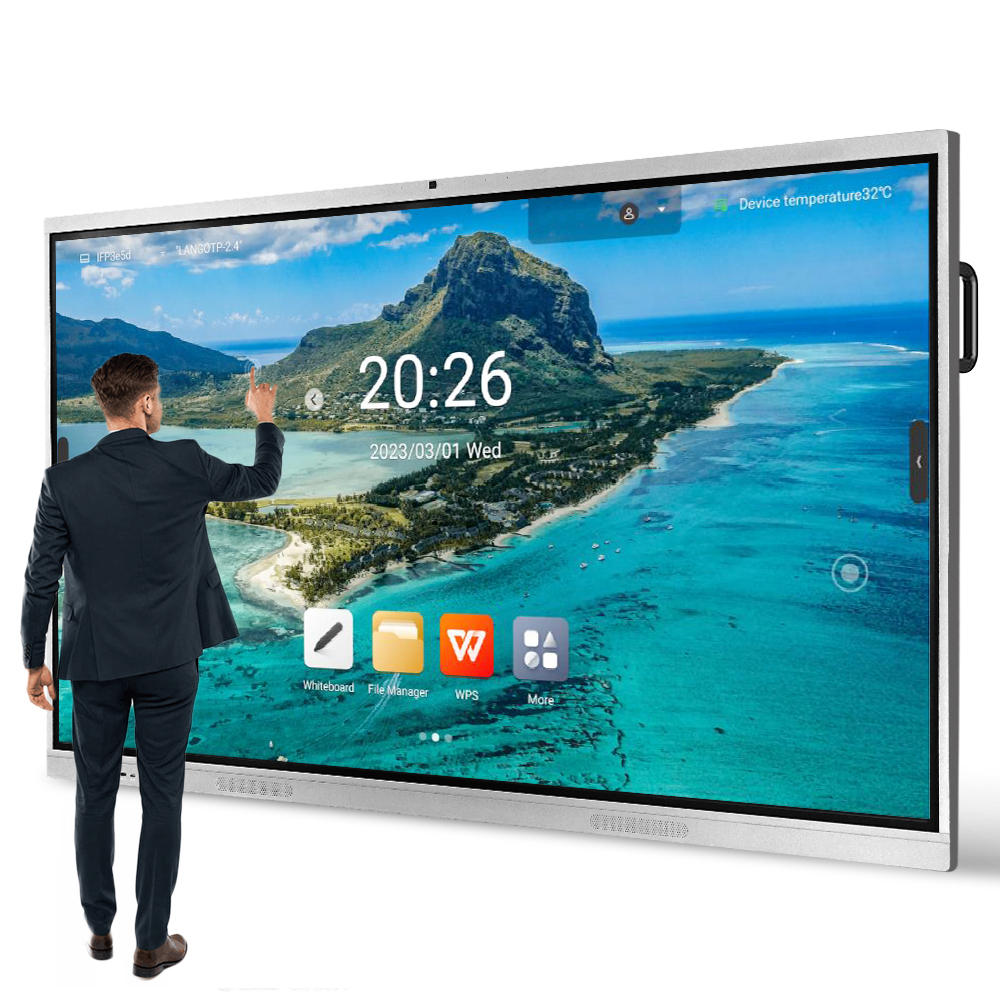
Projectors inherently demand controlled environments. Ambient light is their greatest enemy. Sunlight results in washed-out spreadsheets and strained eyes. Furthermore, whenever a presenter steps up to point at a specific data point, they are met with a blinding beam of light. They also cast a disruptive shadow across the content. This remains a persistent pain point. Conversely, an enterprise-grade interactive whiteboard thrives in fully lit environments. Equipped with 4K UHD resolution and anti-glare tempered glass, these panels maintain crisp contrast regardless of the room's natural lighting.
The fundamental divide between these two solutions lies in user engagement. A standard projection screen operates on a strict viewing-only philosophy. In stark contrast, the advanced touch screen capabilities of modern panels invite physical interaction. High-end models feature 20-point multi-touch technology. Colleagues can annotate over schematics, drag-and-drop digital sticky notes, and navigate complex software directly from the display using their fingers or a stylus.
Legacy setups are notorious for their cable clutter. Presenters often need specific dongles, separate audio cables, and a dedicated laptop just to share a video clip. Today's interactive displays bypass this friction entirely. They come equipped with built-in Android operating systems and Open Pluggable Specification slots for Windows integration. This dual-system architecture offers native wireless casting. Users get direct access to unified communication apps like Zoom and Microsoft Teams without plugging in a single external device.
| Feature | Traditional Projector Setup | Modern Interactive Panel |
|---|---|---|
| Display Quality | Prone to glare, washed out in daylight | 4K UHD, Anti-glare Mohs level 7 glass |
| Hardware Lifespan | 2,000 to 5,000 hours per bulb | Up to 50,000 hours continuous use |
| Interactivity | Passive viewing only | 20-point multi-touch, stylus support |
| Maintenance Needs | High. Requires filter cleaning and bulb swaps | Near zero. Occasional screen wiping |
| System Architecture | Requires external PC, speakers, and baluns | All-in-one built-in Android and Windows OPS |
From an engineering perspective, system reliability drops as the number of connected components increases. A ceiling-mounted projector system has multiple failure points. The bulb burns out. The HDMI balun loses sync. The separate audio receiver fails. The motorized screen jams. An all-in-one flat panel eliminates these variables. Consolidating the camera, microphone array, speakers, and computing power into a single robust chassis drastically reduces technical downtime.
The modern meeting is no longer a solitary monologue. Advanced panels allow multiple users to approach the screen simultaneously. This multi-touch capability transforms a stagnant weekly update into a highly dynamic working session. Gone are the days of writing "DO NOT ERASE" on a whiteboard or taking blurry smartphone photos of meeting notes. Digital canvases allow teams to save annotated files directly to secure cloud storage. You can instantly email the session notes to all attendees before they even leave the room.
Purchasing a large-format conference display presents a noticeable initial sticker shock compared to a basic projector. However, hardware procurement requires a broader view. A comprehensive Total Cost of Ownership analysis paints a very different picture over a five-year lifespan. Projectors harbor hidden, ongoing expenses. Costly replacement bulbs add up quickly. Furthermore, the expensive IT labor hours spent troubleshooting connectivity issues and managing separate audio-video peripherals drain operational budgets.
Determining the true value of your hardware requires looking beyond the invoice. A proper calculation factors in the elimination of consumable maintenance costs. It includes the drastic reduction of IT support tickets. Most importantly, it accounts for the massive boost in meeting efficiency. When meetings start precisely on time without technical delays, the recovered productivity hours quickly offset the initial hardware investment.
Context dictates the hardware. Do not buy a screen based on abstract features alone. Match the panel size directly to the physical dimensions of your room to ensure optimal viewing angles.
Huddle Spaces: For small rooms accommodating 2 to 5 people, a 55-inch or 65-inch panel provides perfect visibility without overwhelming the space.
Standard Meeting Rooms: For rooms seating 6 to 10 individuals, a 75-inch display is the industry standard. It ensures text is legible from the back of the table.
Executive Boardrooms: For larger spaces seating 10 to 20 people, an 86-inch model is highly recommended to maintain 4K clarity at a distance.
Massive Auditoriums: For town hall spaces where content must be viewed from 50 feet away, a high-lumen laser projector remains the pragmatic choice.
For enterprise IT departments, manageability is paramount. Modern digital panels offer centralized mobile device management. Administrators can push over-the-air software updates, lock down network security protocols, and monitor hardware health remotely. This lifecycle longevity drastically reduces the daily burden on tech support teams.
Legacy projection systems will always retain their place in large-scale viewing environments and massive auditoriums. However, the modern corporate landscape demands more from its daily workspaces. The dynamic, two-way collaboration fostered by an advanced digital panel is no longer a luxury. It is a baseline requirement for competitive teams. Upgrading your meeting room technology transcends a simple hardware swap. It represents a strategic investment in team productivity, seamless communication, and future-proofed operations. Take the time to assess your current meeting room friction points. Calculate your potential long-term ROI. We highly recommend exploring the high-performance interactive displays available at AIYOS to find the exact hardware specifications tailored to elevate your business workflows.
Yes, there are interactive projector modules and sensor bars available on the market. However, these retrofit solutions often suffer from constant calibration issues. They introduce disruptive presenter shadows and noticeable input lag when compared to a dedicated, purpose-built flat panel.
Traditional projectors require frequent maintenance. You must regularly clean the dust filters and replace expensive bulbs every few thousand hours. In contrast, an interactive flat panel requires virtually zero hardware maintenance aside from occasionally wiping down the glass surface.
A commercial-grade flat panel typically boasts a lifespan of up to 50,000 hours of active screen time with virtually zero degradation in brightness or color accuracy. Traditional projector bulbs usually require replacement every 2,000 to 5,000 hours, and the baseline image quality naturally degrades over time.
Absolutely. Most contemporary displays feature built-in operating systems or Windows OPS modules. This allows them to run unified communication applications natively. You can launch a Zoom or Teams meeting directly from the board without needing to connect a separate laptop.
Not at all. Modern panels are intentionally designed with intuitive, user-friendly interfaces that mimic the smartphones and tablets we use daily. Most employees can confidently start a session, cast their laptop screen, or open a digital whiteboard app with little to no formal training.
Most contemporary displays come equipped with built-in operating systems, such as customized Android platforms, that run essential applications entirely independently. Additionally, many feature Open Pluggable Specification slots. This allows IT teams to slide in a dedicated Windows PC module for full desktop functionality without external cables.
Yes. While an internet connection is required for cloud saving, video conferencing, and web browsing, the core functionalities remain intact offline. Users can still utilize the digital whiteboard, annotate over locally saved files, and cast content via local offline networks.


